
Capture your space
Take a photo or choose one from your library. Add a Care Mode for the perspective that matters to you.
A LITTLE AWARENESS GOES A LONG WAY
The pan handle. The loose cable. The things that blend into everyday life. AvertLens helps you notice visible risks—and take action.
Practical guidance. Your judgment, always.
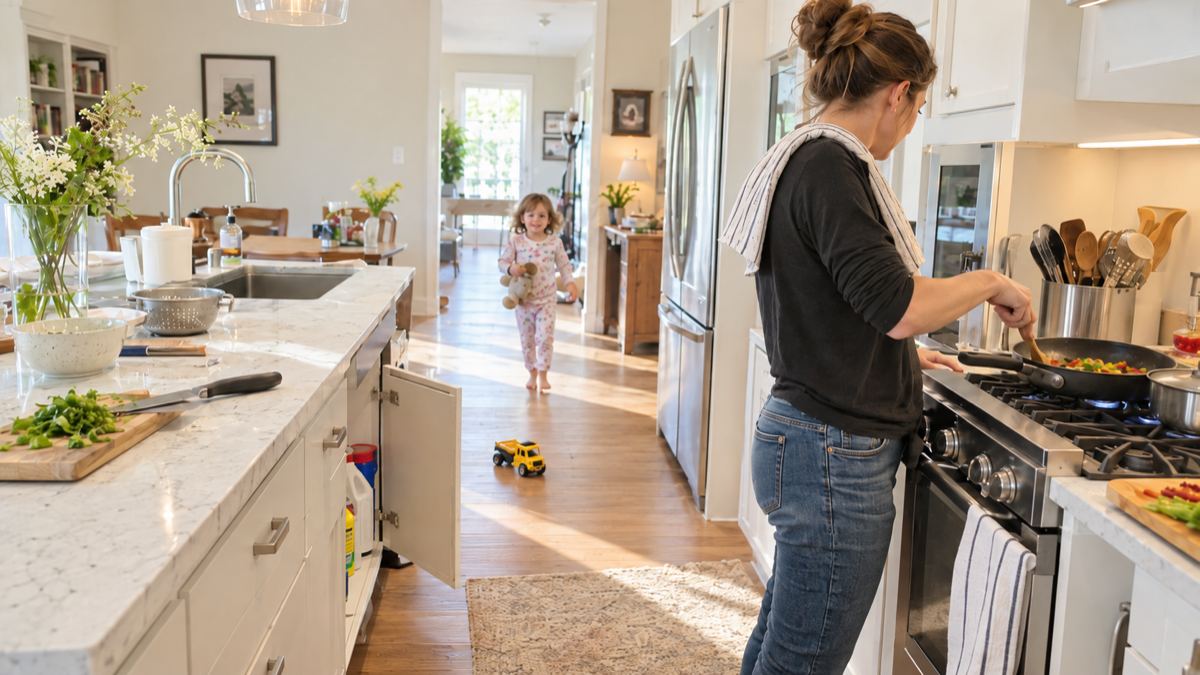 Focused for Young child
A pan handle extends over the walkway, where it could be bumped or pulled.
Turn the handle inward, away from the edge.
Tap a number to explore. Illustrative findings, not a live analysis.
FROM NOTICING TO DOING
No overwhelming checklist.
Start with the space in front of you.
Take a photo or choose one from your library. Add a Care Mode for the perspective that matters to you.
Find visible hazards marked on your photo, with clear explanations and practical suggestions.
Mark a finding as addressed after taking action. Revisit your history and follow your Safety Impact.
SAME SPACE. DIFFERENT PERSPECTIVES.
Choose what matters in this moment. Care Modes help prioritize relevant visible hazards without assuming anyone’s abilities or needs.
Every mode considers visible hazards.
Your selection changes the focus.
A general review of visible hazards in your scene, from obstacles in walkways to objects near an edge.
Small actions.
Visible progress.
Illustrative progress, recorded by you.
KEEP THE MOMENTUM
Good intentions deserve a place to land. Save your analyses, track addressed findings, and see the actions you’ve taken over time.
Discover AvertLens“Addressed” means you marked an action as taken. It does not verify that a scene is safe.
AI can miss or misinterpret hazards. AvertLens reviews what’s visible in a photo—not hidden, structural, medical, or off-camera conditions. Use your judgment and qualified help when needed.
Visible risks in everyday spaces, such as a loose cable, an object near an edge, or a blocked walkway. Results explain why a finding might matter and suggest a practical next step. A photo cannot reveal every risk.
No. Lighting, camera angle, obstructions, and AI limitations can affect the analysis. No result or progress indicator is a safety assessment or certification.
Your selected photo and relevant context are sent for AI analysis. Saved analyses and images support your account’s history. Read our Privacy Policy for data handling, service providers, and deletion information.
Plus offers a monthly analysis allowance with monthly or yearly subscription options. Your current allowance, local price, and renewal terms are shown in the app before purchase. Store availability may vary.
Yes. Choose a default Care Mode and select a different one for an individual analysis. General, Young child, Older adult, Limited mobility, and Pet help you choose the focus that fits your situation.
MAKE ROOM FOR A LITTLE MORE AWARENESS
Available on Android and iOS.